


Meta Ads Manager
4.04.45K Reviews
App Specs
- Version
- 496.2.0.54.107
- Updated On
- License
- Free
- Downloads
- 10,000,000+
- Developer
- Meta Platforms, Inc.
- Categories
- Business
- Platform
- Android, iOS
Screenshots
 Analysis by AppCompare
I find a shared-device scenario is where the practical boundaries of Meta Ads Manager matter most. A shop owner might hand a phone to a colleague to check whether a promotion is still running, while the same device is also used for personal browsing or family tasks. The app is a business tool, not a household dashboard: I would keep work activity clearly separate and avoid passing an unlocked device around as if everyone using it were part of the same advertising team.
Keep work access deliberate
Before anyone else uses the phone, I’d check which account is signed in and whether the person holding it should be able to view or change campaigns. A quick performance check can turn into an accidental edit if the wrong person taps through the campaign controls. For shared phones, signing out of work accounts when finished and using the device’s own screen-lock options are sensible habits; those are device practices, not special family controls inside the app.
This distinction is especially useful for small businesses run from home. One person may create ads, another may handle customer messages elsewhere, and children may borrow the same phone for unrelated reasons. I would not treat a shared login as a convenient substitute for clear responsibilities. If several people need to manage advertising, agree on who approves changes and who only checks results before the phone changes hands.
Coordinate before changing a live campaign
The mobile controls make quick adjustments tempting, but a pause, edit, or budget change can affect work someone else is monitoring. My practical rule would be to send a short message to the person responsible before changing a live campaign, then say exactly what was changed. That simple handoff helps avoid two people making conflicting decisions from different screens or assumptions.
For example, imagine a family-run bakery preparing for a weekend promotion. The owner checks the campaign while waiting for a supplier, notices the ad is still active, and wants to adjust it. Rather than making a change on impulse, they can confirm with the person who planned the offer, check that the audience and budget still match the intended promotion, and then make one deliberate edit. The app is useful for acting promptly; shared understanding is what keeps that speed from becoming confusion.
It also helps to separate monitoring from planning. I use a phone review to spot something that needs attention, not to rebuild a complicated campaign in a hurry. If an adjustment involves several decisions—such as changing the offer, audience, and timing together—I’d rather pause and review the setup carefully than make a chain of edits on a small screen.
Age, trust, and the right person for the job
Meta Ads Manager is a business app developed by Meta Platforms, Inc., and its content age rating is Everyone. That rating does not make campaign management a suitable task for every person who can access the phone. Advertising decisions involve business goals and spending, so I’d reserve account access for adults or trusted colleagues who understand what a campaign is meant to do.
Worth Reading Before You Choose

Flipboard Shows What News Apps Must Do Beyond the Feed

Switching to Android Auto Means Rethinking Your Driving Routine

Google Calendar Makes a Crowded Week Easier to Manage

Ludo King Makes the Most of the Minutes Between Plans

Baby Panda World Brings Quick Play to Modern Phones, but Its Game Library Feels Busy

ESPN’s Live Game View Makes Following Close Games Easier
I would also explain the difference between looking at results and changing an ad. A person who is only checking whether a promotion is active does not necessarily need to make edits. Clear boundaries reduce accidental taps and keep business decisions with the people who are accountable for them. If someone in the household is too young to understand those consequences, I would keep the app and signed-in account out of their hands.
Where the app fits among advertising tools
Compared with checking campaigns in a desktop browser, the phone app is strongest when the task is immediate: review performance, respond to a notification, or make a straightforward adjustment while away from a computer. A desktop workflow is usually more comfortable when I need to compare lots of settings, inspect several campaigns side by side, or spend time planning a larger change. I see the app as a useful companion to that fuller working setup, rather than a reason to do every advertising task on a phone.
It is also focused on Meta advertising, so it should not be mistaken for a single control room for every ad network. Someone running campaigns across unrelated platforms may still need each platform’s own tools or a separate reporting workflow. The convenience here comes from working with Meta campaigns in one place, not from replacing every business or analytics service a marketer might use.
The app is free, and its popularity is reflected in an average rating of 4.3 from around 533,000 ratings, with more than 10 million installs. Those figures tell me it has broad use, but they do not guarantee that every workflow will feel smooth on every device. The current version is 478.0.0.57.106, and I would still judge it by whether its mobile controls suit the way a particular business manages campaigns.
For a sole trader or a small team already advertising through Meta, the clearest benefit is being able to check and handle routine campaign work without waiting to get back to a desk. I would recommend it to someone who knows what they want to monitor and values quick access. I would skip it as a primary workspace if I were managing a complicated campaign structure, needed a broad cross-platform view, or had no clear agreement about who is allowed to make changes.
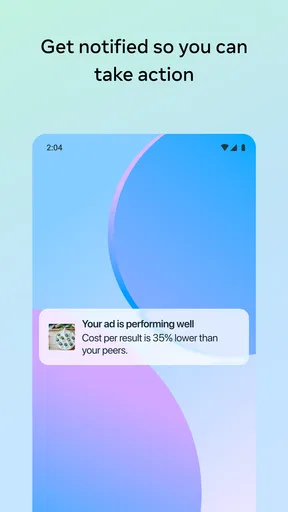
One useful habit is to treat notifications as prompts to inspect, not as instructions to act. A performance alert can tell you that something deserves attention, but the reason may need context: compare it with the campaign’s goal and the timing of the promotion before changing anything. That keeps a momentary fluctuation from triggering an unnecessary edit.
For a new advertiser, I’d start by learning the campaign’s intended audience, budget, and objective before relying on mobile adjustments. If those basics are unclear, the convenience of editing from a phone can make it easier to change settings without understanding the consequences. The app is most helpful when it supports a plan, not when it is expected to create one by itself.
Meta Ads Manager was formerly Facebook Ads Manager, and that history helps explain its role: it is centered on managing advertising in Meta’s ecosystem. The release date is June 29, 2015, but what matters more in daily use is whether the current mobile workflow meets your needs. I’d keep a desktop option available for careful planning and use the phone for timely checks and simpler actions.
For households, the final question is less about who can download the app and more about who should control the signed-in business account. A shared phone can make quick checks convenient, but it also blurs responsibility unless people agree on access and communication. With those boundaries in place, it can be a practical tool for a small business; without them, I would avoid treating it as a casual app for everyone in the home.
Hey there! If you've ever tried to juggle multiple ad campaigns across platforms, you know it can be a bit like trying to tame a herd of wild cats. That's where Meta Ads Manager comes in. This nifty app is here to streamline the whole process, making it a breeze to manage your Facebook and Instagram ads all in one place.
Getting Started with Meta Ads Manager
First things first, installing Meta Ads Manager is a walk in the park. Available on both Android and iOS, just head to the Google Play Store or Apple App Store, hit download, and you're off to the races. Once it's installed, logging in with your Facebook account is a cinch, and you're greeted with a sleek, intuitive interface.
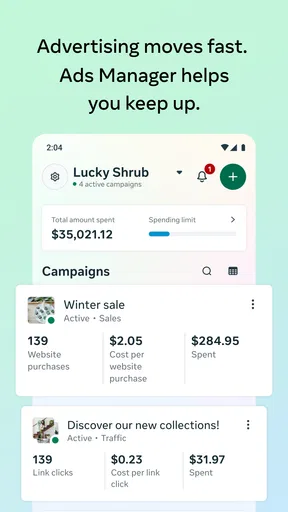
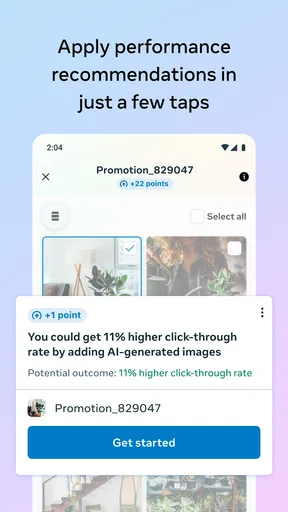
Right off the bat, the dashboard gives you a clear overview of your active campaigns. You can see at a glance how each ad is performing, with metrics like reach, engagement, and conversion rates all laid out in an easy-to-digest format. It's like having your own personal assistant, minus the coffee runs!
Diving into the Features
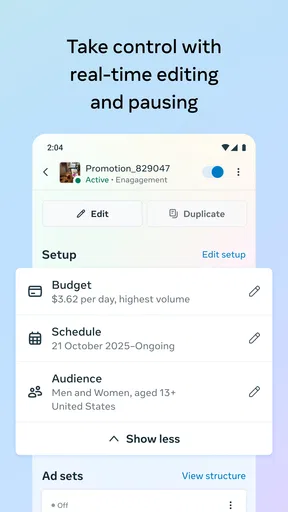
One of the standout features is the ability to create new campaigns directly from your phone. It's perfect for those moments when inspiration strikes while you're on the go. You can customize your audience, set your budget, and even preview how your ads will look. It’s incredibly handy and saves so much time compared to firing up a desktop.
Managing your ads has never been easier. You can pause, edit, or extend campaigns with just a few taps. The app also sends you real-time notifications, so you’re always in the loop about how your ads are performing. No more frantic last-minute checks at the office!
Insights and Analytics
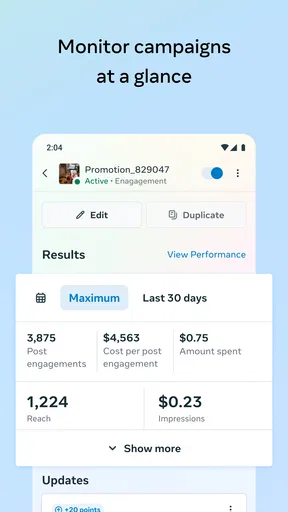
If you're a data nerd like me, you’ll love the insights section. Meta Ads Manager provides detailed analytics that help you understand your audience better. You can track performance over time, pinpoint what’s working, and tweak your strategy accordingly. It's like having a crystal ball, but way more reliable.
The app also allows you to export reports, which is super helpful when you need to present results to your team or clients. The reports are detailed yet easy to understand, ensuring everyone’s on the same page.
User Experience and Design
The design of the app is clean and user-friendly. Meta has done a great job of ensuring that even those new to advertising can find their way around. Everything is logically organized, and the learning curve is surprisingly gentle. It’s both powerful and accessible, which is a rare combo.
One minor gripe might be that the app can occasionally lag if you’re juggling a ton of campaigns, but it’s a rare occurrence and usually resolves quickly. Just a small hiccup in an otherwise smooth ride.
Final Thoughts
In a world where digital marketing is king, Meta Ads Manager is an invaluable tool for anyone looking to streamline their advertising efforts. Whether you’re a seasoned marketer or a small business owner dipping your toes into the ad world, this app offers everything you need to run successful campaigns from anywhere. It's user-friendly, packed with features, and, most importantly, it works.
So, if you haven’t already, give Meta Ads Manager a whirl. It's a game-changer, and once you get the hang of it, you’ll wonder how you ever managed without it. Happy advertising!
Pros
- User-friendly interface for easy navigation.
- Real-time performance tracking and updates.
- Customizable ad targeting options.
- Integrated with multiple Meta platforms.
- Comprehensive analytics and reporting tools.
Cons
- Occasional lag in data synchronization.
- Limited offline accessibility.
- Complex setup for beginners.
- High data consumption on mobile networks.
- Requires frequent updates for optimal use.
FAQs for Meta Ads Manager
What is Meta Ads Manager and how can it benefit my business?
Meta Ads Manager is a comprehensive tool designed for creating, managing, and analyzing advertising campaigns across Facebook, Instagram, and other Meta platforms. It offers detailed targeting options and performance insights to help businesses optimize their ad spend and reach their desired audience effectively. The app's intuitive interface makes it accessible even for users with minimal advertising experience.
Is Meta Ads Manager free to use, or are there costs involved?
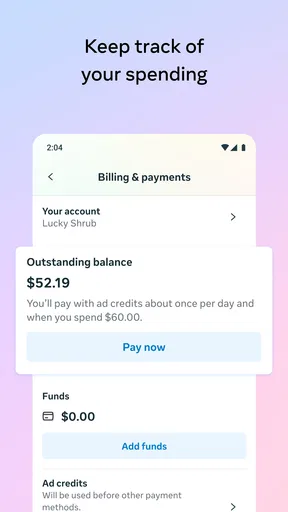
Downloading and using the Meta Ads Manager app is free. However, to run advertising campaigns, you will need to set a budget and pay for the ads themselves. Costs vary depending on targeting options, ad placements, and bidding strategies. It's crucial to set a budget that aligns with your business goals and monitor spending regularly.
Can I manage multiple ad accounts with Meta Ads Manager?
Yes, Meta Ads Manager allows you to manage multiple ad accounts from a single interface. This is particularly beneficial for agencies or businesses with several brands. You can easily switch between accounts, monitor performance, and tweak campaigns without needing multiple logins, streamlining the advertising process.
What kind of analytics does Meta Ads Manager provide?
Meta Ads Manager provides comprehensive analytics, including metrics like reach, impressions, conversions, and engagement rates. Users can track the performance of their campaigns in real-time and access detailed reports that help identify successful strategies and areas for improvement. The insights can be customized to focus on specific goals or metrics important to your business.
Is Meta Ads Manager suitable for beginners?
While Meta Ads Manager offers advanced features for seasoned marketers, it is also designed to be user-friendly for beginners. The app includes guided steps for setting up campaigns, helpful tips, and resources to understand the ad creation process. For those new to digital advertising, starting with simpler campaigns and gradually exploring more features is recommended.


